 Contacts
|
<< Click to Display Table of Contents >>
|
  
|
This option allows to enter Phone Numbers that receive many calls and whose Reputation is already known. When Add a new Phone Number, it must specify:
oNumber: Phone Number
oOwner: Phone Number Owner or Contact Name
oAllow: Specify whether the Phone Number is on a whitelist (Allow) or a blacklist (Not Allow)
oGroup: Group to which the Phone Number belongs. By Default Without Group
When enter, it show:
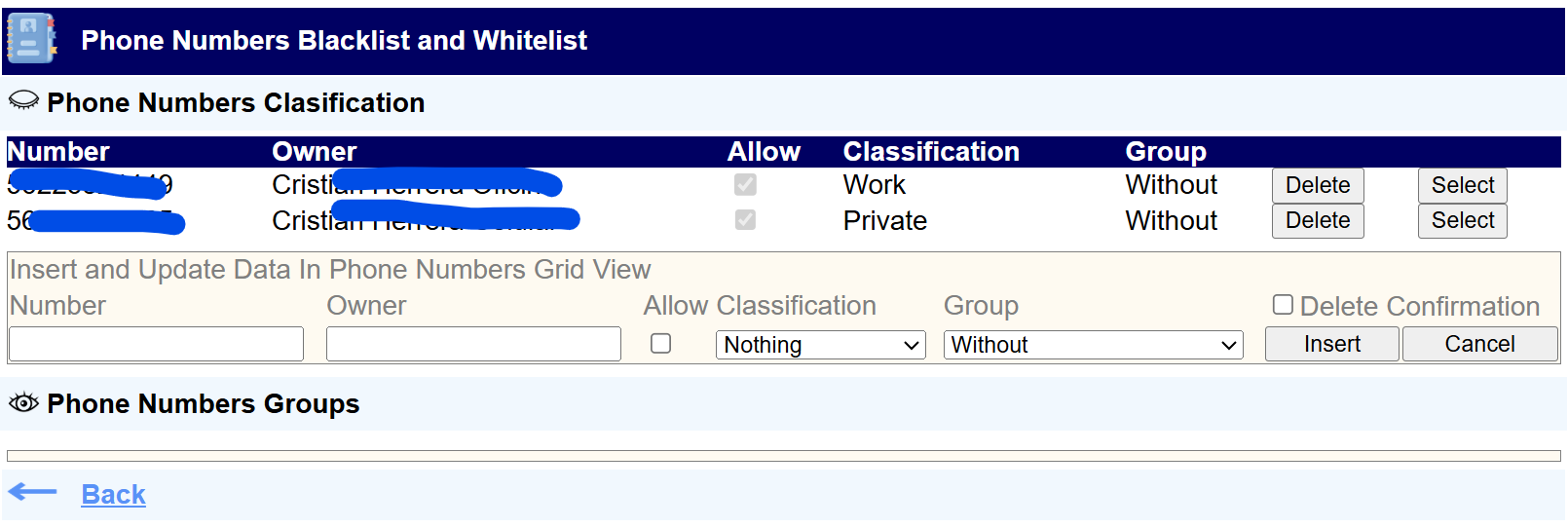
This form consists of two grids, which can be shown (by pressing  ) and/or hidden (by pressing
  ):
):
When enter to this page this Grid is visible

This Grid allows to Add, Modify, and Delete Phone Numbers

Enter the following data
oNumber
oOwner Name
oSpecify if it is a Allowed Number
oClassification. From the combo box, it can select:
▪Nothing
▪Spam
▪Fraud
▪Money Collection
▪Work
▪Private
oGroup to which the Phone Number belongs. By default, there is only the "Without" Group, which is assigned by default to the Numbers. To Add Groups, view Phone Numbers Group
Press Insert button
To Modify Phone Number, Select this in the Grid, by pressing the Select button in the row where the Data Number is

The Selected Number Data appear in bellow editing box

Modify the Selected Number Data and press Update button
To Delete Phone Number: Enable Check Box Delete Confirmation and press Delete button

When enter to this page this Grid is hide. Pressing in Phone Number Group show

The process of Add, Modify, and Delete Groups is similar to that used in Phone Number Classification Grid